


botim
4.37.38K Reviews
App Specs
- Version
- 4.15.1
- Updated On
- License
- Free
- Downloads
- 100,000,000+
- Developer
- ALGENTO DMCC
- Categories
- Communication
- Platform
- Android, iOS
Screenshots
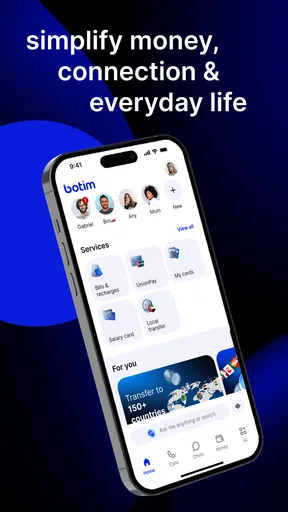

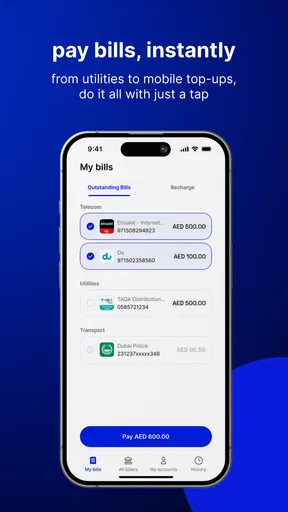
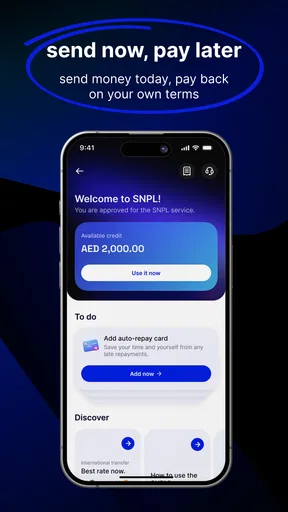



 Analysis by AppCompare
I reach for communication apps when I need a conversation to fit around the rest of my day, not take it over. That is the lens through which I judge Botim: whether a quick message can stay quick, whether a call feels worth the interruption, and whether group chat makes it easier to coordinate or simply adds more noise. It is a free communication app from Algento Cloud Computing Limited, and its appeal is clearest for people who want messaging and calls in one familiar place.
A practical way to stay in touch
Botim suits the ordinary mix of conversations most of us have: a one-to-one check-in, a family group sharing updates, or a call when text would be too slow. That range matters because it lets you choose the level of attention a conversation deserves. A short message can handle a simple plan; voice or video can make a more personal exchange feel less distant.
For example, imagine trying to arrange a weekend visit while you are between errands. You can send the group a concise update rather than calling everyone separately, then switch to a group call if the details become confusing. That is a useful rhythm: keep routine coordination lightweight, and use a call when hearing someone’s tone or resolving several questions together will save time.
Botim has a 4.3 average from around 1.2 million ratings and has passed 100 million installs. Those figures suggest it has a broad audience, but they do not tell me whether it fits your contacts or your habits. The more important question is practical: are the people you want to reach willing and able to use the same app? A communication tool is only convenient when your circle actually meets you there.
Using Botim in everyday life
Getting started is straightforward. The app uses a phone number and an OTP verification step, so the account setup follows a pattern many messaging users already know. That can make the first few minutes feel familiar rather than like learning a new system. I would still think about which number you want associated with your account before beginning, especially if you separate work and personal communication.
The interface felt easy to navigate in my experience. That helps when you open the app with a specific purpose—reply to a relative, find a group conversation, or start a call—rather than wanting to explore menus. A simple layout is not just about appearance; it can reduce the little delays that make checking messages feel like another task.
Calls work best when the moment suits them
Voice and video calls are central to the experience. I found the sound and picture clear in the calls I tried, though occasional lag can interrupt the flow. That is a reminder to treat any internet-based call as dependent on the conditions at both ends. If a conversation is important, it is sensible to have a fallback plan, such as switching to voice or sending a short message if video becomes choppy.
Worth Reading Before You Choose

Switching to Android Auto Means Rethinking Your Driving Routine

Google Calendar Makes a Crowded Week Easier to Manage

Baby Panda World Brings Quick Play to Modern Phones, but Its Game Library Feels Busy

ESPN’s Live Game View Makes Following Close Games Easier

QuizzLand Review: A Good Fit for Short Trivia Breaks, Not Every Player

Basketball Stars: Multiplayer Is Fast, but Can It Recover When Matches Go Wrong?
Group calling is useful for shared plans and quick catch-ups, but it is not automatically better than a text thread. Calls ask everyone to be available at once, while messages let people answer when they have a pause. I would use a group call when the group needs to settle something together, and keep an update in chat when there is no need to interrupt everyone’s day.
Messaging without making every exchange urgent
Text, voice messages, images, and videos cover several different communication styles. A voice message can preserve warmth when typing is inconvenient, while a photo can explain something more clearly than a string of descriptions. The trade-off is that richer messages also invite longer replies and more attention, so I try to match the format to the importance of the information.
Groups and broadcast lists can save time when the same update needs to reach several people. Before sending, I would pause to decide whether everyone really needs the message. A group is better for discussion among members; a broadcast-style update is more appropriate when people need the same information but do not need to reply to one another. That small choice can prevent a useful tool from becoming a source of unnecessary chatter.
Emojis and stickers add a casual tone, which works well with friends and family. In a practical conversation, though, I would not rely on them to carry important details. A clear sentence with the time, place, or request is easier to act on than a playful reaction that leaves room for interpretation.
Privacy and everyday boundaries
Encryption is part of Botim’s appeal for people who care about keeping conversations private. I see that as a useful baseline, not a reason to share sensitive information casually. Good habits still matter: check that you are writing in the intended conversation, be thoughtful about what you forward, and avoid treating any chat app as a substitute for careful judgment.
The app does not bombard me with ads in the experience described here, which helps keep attention on the conversation. Still, fewer interruptions do not mean every notification deserves an immediate response. If group chats begin to pull you away from work or rest, a practical approach is to decide when you will check them instead of opening the app whenever a new message appears. That boundary is a personal habit, not something an app can set for you.
Botim is designed to work in regions where certain other apps may be restricted, which can make it a useful option for people whose usual communication choices are unreliable in their location. That does not mean every contact will use it or that every connection will be perfect. I would check whether the people I need to reach are comfortable installing it before making it my only way to communicate.
Where it fits among messaging alternatives
Compared with a basic SMS thread, Botim brings calls, group conversations, and media sharing into one app. Compared with other internet messaging apps, its biggest practical advantage is not a universal feature that makes every alternative obsolete; it is whether the combination of calling and messaging works for your contacts and circumstances. If everyone you know already uses another service, asking them to move may create more friction than the switch solves.
It is also not the best choice for every communication need. Someone who mainly wants occasional calls may prefer a dedicated calling option already used by their family. Someone who wants a work chat governed by an organization’s tools should use the service their colleagues rely on, rather than splitting conversations across personal apps. And if you dislike phone-number-based account setup, that part of getting started may not suit you.
The app is free to download, with in-app purchases ranging from $0.99 to $49.99 per item. I would treat those purchases as optional and look at what is included before spending; the everyday value of a communication app depends first on whether its core conversations work for you. Its Everyone age rating makes it broadly accessible, but parents should still use their own judgment about who children communicate with and what they share.
Who is likely to appreciate it
I would recommend trying Botim if your family or friends already use it, if you want calls and messaging together, or if access to familiar alternatives is a concern where you live. It is also a reasonable fit for people who prefer a straightforward interface and want to move between a quick text and a face-to-face conversation without changing apps.
I would be more cautious if your social circle is firmly settled elsewhere, if call interruptions are a problem, or if you need a tool built specifically for formal workplace coordination. The best app is often the one the other person will actually answer. Installing another messenger without a clear reason can create duplicate groups, split attention, and make it harder to remember where important information was shared.
For a less distracting setup, I would start with only the conversations I genuinely need, use groups for shared discussion rather than every announcement, and choose calls when they resolve something that text would drag out. If the app becomes another reason to check the phone, scale back how often you open it. That is a more useful test than counting features: does it make your communication clearer, or merely more constant?
Botim is currently on version 4.10.3 and supports Android 6.0 and later. Those details make it worth checking compatibility before installing on an older device. The app first appeared on August 27, 2017, and its established presence is reassuring for people looking for a widely used option, although popularity alone cannot guarantee that it will perform well on every network or suit every contact.
I recently got my hands on the Botim app, and I've got to say, it’s making quite the splash in the world of communication apps. If you haven’t heard about it yet, let me take you through my experience with it and why it might just be the app you’ve been looking for.
Getting Started with Botim
Installing Botim was a breeze. Available on both Android and iOS, I hopped onto the app store and had it downloaded in a jiffy. The setup was straightforward. You just need to enter your phone number, verify it with the OTP, and boom, you're in!
One thing that struck me right away was its clean and intuitive interface. Everything is neatly laid out, making navigation smooth even for someone who's not tech-savvy. The app feels light and zippy, which is a huge plus in my book.
Features That Stand Out
After spending some time with the app, I discovered a bunch of features that make it stand out from the crowd. First up is the voice and video call quality. In my experience, the calls were crisp and clear. Whether I was chatting with a friend across town or a relative overseas, the connection was seamless.
But wait, it gets better. Botim supports group calls, allowing you to bring in your entire squad for a chat. Perfect for those weekend catch-ups or quick team meetings. Plus, the app offers encrypted messaging, ensuring your conversations are safe and private.
The Messaging Experience
The chatting feature is where I spent most of my time. From sending texts, voice messages, to sharing images and videos, everything worked like a charm. The app is packed with a variety of emojis and stickers, making conversations lively and fun.
One feature I particularly liked was the ability to create groups and broadcast lists. It’s super handy when you want to send updates to multiple people without having to message them individually. A small feature, but it makes a huge difference.
Why You Might Love Botim
If you’re someone who values privacy, Botim’s got you covered. With end-to-end encryption, you can chat freely without worrying about prying eyes. Plus, the app doesn’t bombard you with ads, which is a refreshing change.
Another aspect worth mentioning is its performance in regions where certain apps are restricted. Botim is designed to work in these areas, making it a reliable choice for staying connected with friends and family around the globe.
Things to Keep in Mind
While my experience with Botim was largely positive, I did notice a couple of things that could be improved. Occasionally, there were minor lags during calls, but nothing too disruptive. Also, while the app is free, there are premium features that require a subscription. Depending on your needs, this might be something to consider.
All in all, Botim is a solid choice for anyone looking to enhance their communication experience. With its array of features, user-friendly design, and excellent performance, it’s definitely worth giving a shot.
If you’re on the hunt for a reliable app to stay connected with your loved ones, why not give Botim a try? You might just find yourself hooked, just like I did!
Pros
- User-friendly interface; easy to navigate.
- Supports high-quality video calls.
- Works well on low-bandwidth networks.
- End-to-end encryption for security.
- Cross-platform compatibility.
Cons
- Contains in-app ads.
- Limited free features without subscription.
- Occasional call drops reported.
- Requires phone number for signup.
- Some features need stable internet.
FAQs for botim
What is Botim and how does it work?
Botim is a communication app that allows users to make voice and video calls, send messages, and share multimedia files. It operates over the internet using Wi-Fi or cellular data, enabling connectivity with friends and family worldwide. The app is designed with a user-friendly interface, ensuring easy navigation for all age groups.
Is Botim free to use?
Botim offers free basic services like messaging and calling, but it may require a subscription for high-quality video calls or additional features. Some regions might have specific charges, so it's important to check local pricing and any in-app purchases before downloading the app to avoid unexpected costs.
How secure is Botim regarding privacy and data protection?
Botim employs encryption to secure user data during transmission, ensuring privacy in calls and messages. However, users should review the app’s privacy policy and terms of service to understand data handling practices. Regular updates and security features are implemented to protect user information from unauthorized access.
Can Botim be used on both Android and iOS devices?
Yes, Botim is available for both Android and iOS platforms. It can be downloaded from the Google Play Store for Android devices and the Apple App Store for iOS devices. The app supports cross-platform communication, allowing users on different systems to connect seamlessly.
Does Botim require a stable internet connection?
Yes, Botim requires a stable internet connection to function properly. It uses Wi-Fi or mobile data to facilitate calls and messaging. A stronger connection will result in better call quality and faster message delivery, while a weak connection may cause interruptions or delays.


